← Back to work

HPDash OS

I designed and built HPDash OS: an operations system for a rural LPG distributorship whose government portal took too many steps and slowed to a crawl under its own data. What the business needed instead was something user-friendly, a real operating system for the people running it, not just a record of them.

HPDash OS
Timeline
1.5 months
My Role
Product Strategy, Design + Build
Team
Me + the HP agency owner
Platform / Tools
Web + Mobile · Claude Code · Antigravity · Material Design
Goal

Give a rural LPG distributorship a system of insight to sit alongside the government system of record: one place to find any consumer, see who needs contacting, assign that work, and know it got done.

Challenge

The HPCL portal answered only HPCL's questions. An LPG distributorship delivers cooking gas cylinders to households across a cluster of villages. HPCL built the portal to keep records, not to run a business. Every consumer, every refill, every KYC status sat inside it, and none of it was usable.

To look up one consumer, staff needed the ID printed on the physical LPG copy. No name search, no phone search, no village search. But consumers call and say their name and their village, so the most common enquiry in the operation failed before it started.

Everything above the individual record was worse. There was no way to ask who hasn't refilled in two months, or who still has KYC pending. Nobody can build those lists one lookup at a time, and one lookup at a time was all the portal allowed. Meanwhile the work built on that data lived in Excel sheets and the owner's memory.
“
In the HPCL portal, I can't see all the data in one place. I have to log in many times and download data.
Distributor · Himachal Pradesh

Consumers give their name and their village, not a consumer number. The portal only ever gave them one way in.

1
searchable field, the printed consumer ID
0
aggregate views of the consumer base
Discovery

I interviewed the owner and watched him work before I designed anything. The pain he named first wasn’t slowness. It was the number of steps between a question and an answer: log in, password, OTP, search, and often an export to a spreadsheet, on infrastructure that stalls under national load.

Then one thing from that session changed the scope entirely. His real job isn’t looking up consumers, it’s directing five people. He tracked assignments across Excel and memory and couldn’t say at the end of a week what had actually been done. The lookup problem was visible. The accountability problem was expensive. That reframed the brief from a search tool to an operations system.

I also found something neither of us expected. Roughly 72% of all bookings arrive through IVRS, with the distributor’s own channels near zero. He’d never seen it, because nothing had ever aggregated it.

Before and after
Before · 7 steps, 3 systems
Open the HPCL portal
Password, then OTP
Search by consumer ID
Export to a spreadsheet
Cross-check Excel tracker
Tell the employee verbally
Ask later if it got done

Steps 1 to 4 ran on HPCL. Step 5 ran on Excel. Steps 6 and 7 ran on memory.

After · 3 steps, 1 system
Log in to HPDash
Search the full base
Assign or note inline
Logged automatically

The record keeps itself. Nobody has to remember.

My approach

I built a parallel system, not a replacement. HPCL stays the system of record. Data flows in by CSV, and the layer on top does what the portal won’t: index it, segment it, act on it.

The trade-off: data is only as fresh as the last upload. For a business that plans in days, not seconds, that was the right price. HPCL owns the record. HPDash owns the work that happens because of it, and that split is what let a system built in a month and a half stay simple enough to trust.

HPCL
System of record
CSV
HPDash OS
System of insight
Consumer index
Assignments and activity log
Outreach and reminders
Consumers
Call WhatsApp

HPCL is untouched. Everything right of the CSV boundary is what I built.

Impact & outcomes
2,956
consumers due a refill, listed and callable
~72%
of bookings traced to one automated phone line
5,756
consumers run by five people from a single screen

Beyond the numbers: the system is in daily production use by all five staff, and the HPCL portal has gone from the daily working surface to a background source of record. They built their own thing and stopped going back.

01

One stop solution for business dashboard and consumer details

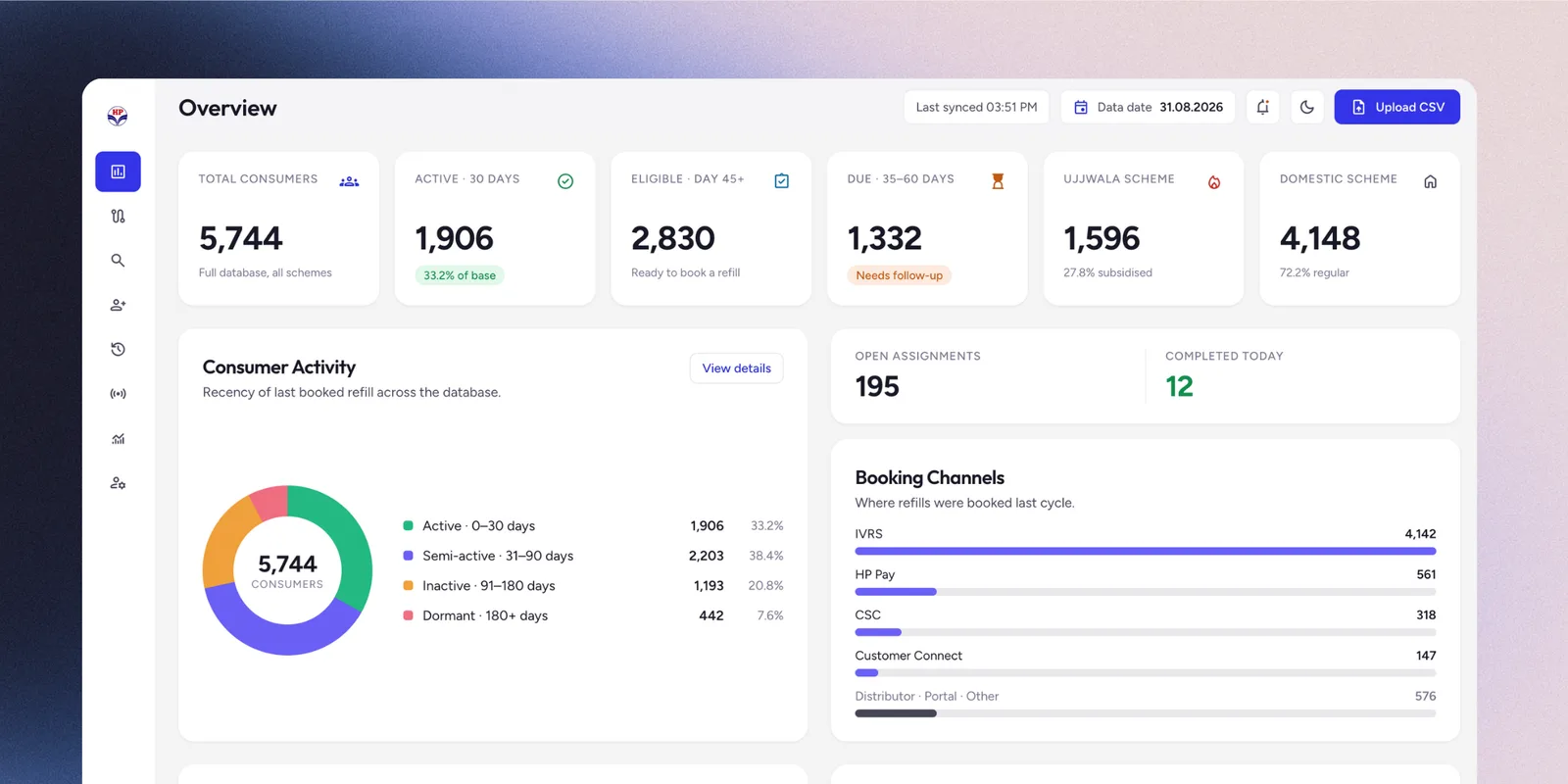
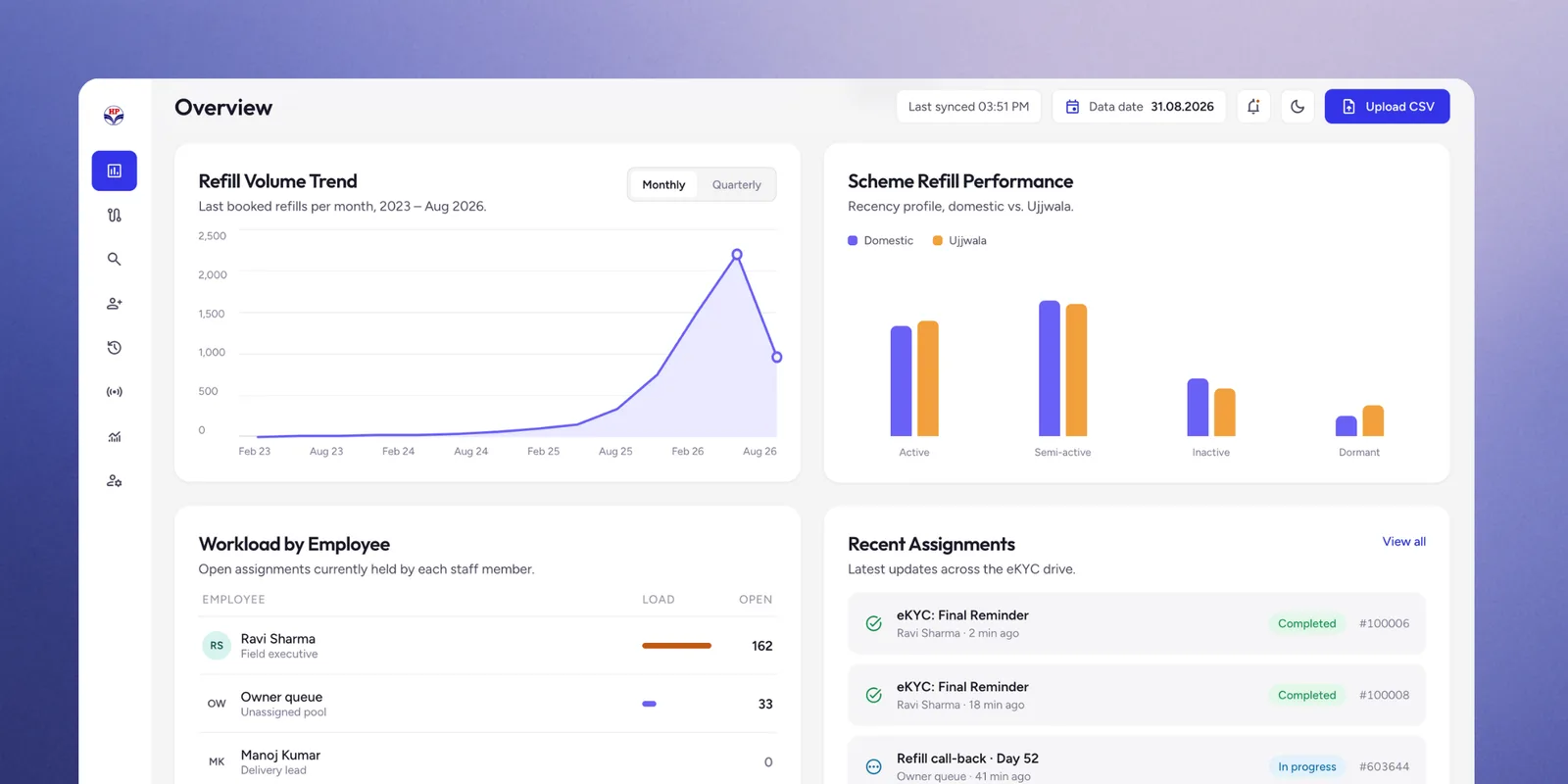
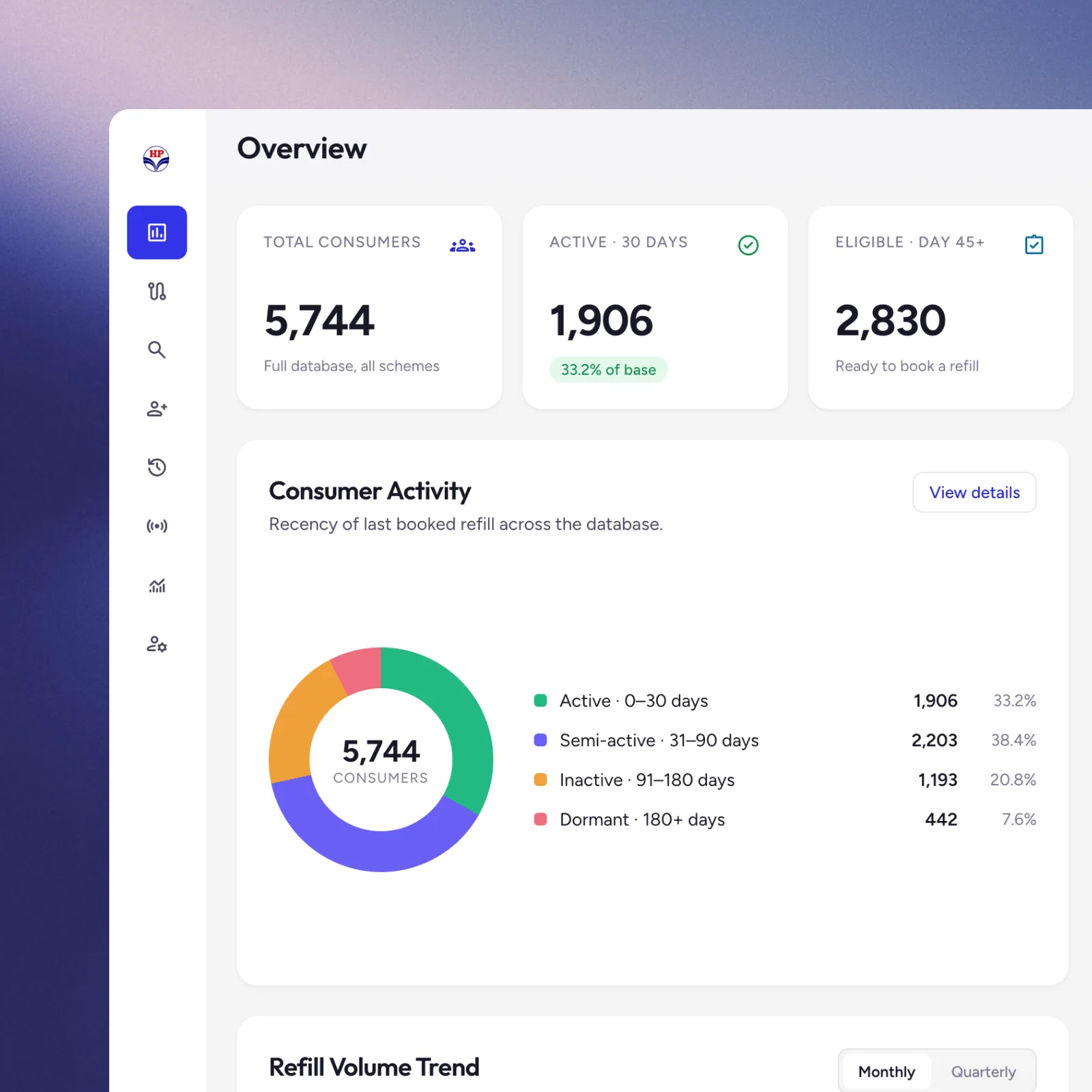
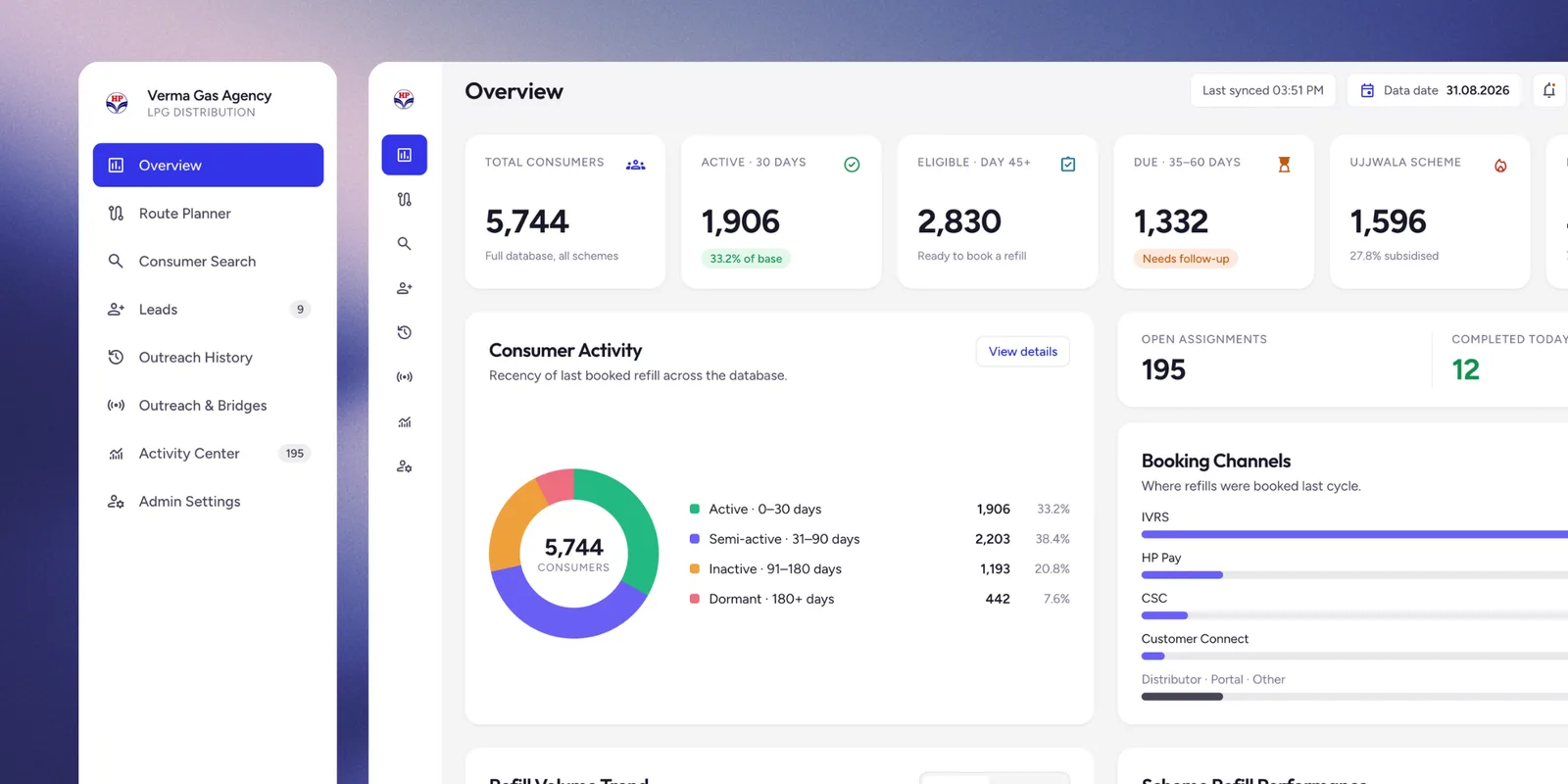
One dashboard now gives the owner everything at a glance: total consumers, who’s active, eligible, or overdue, refill trends, booking channels, and workload by employee, all updated with a CSV upload. What used to live in his head or scattered exports is now one screen.


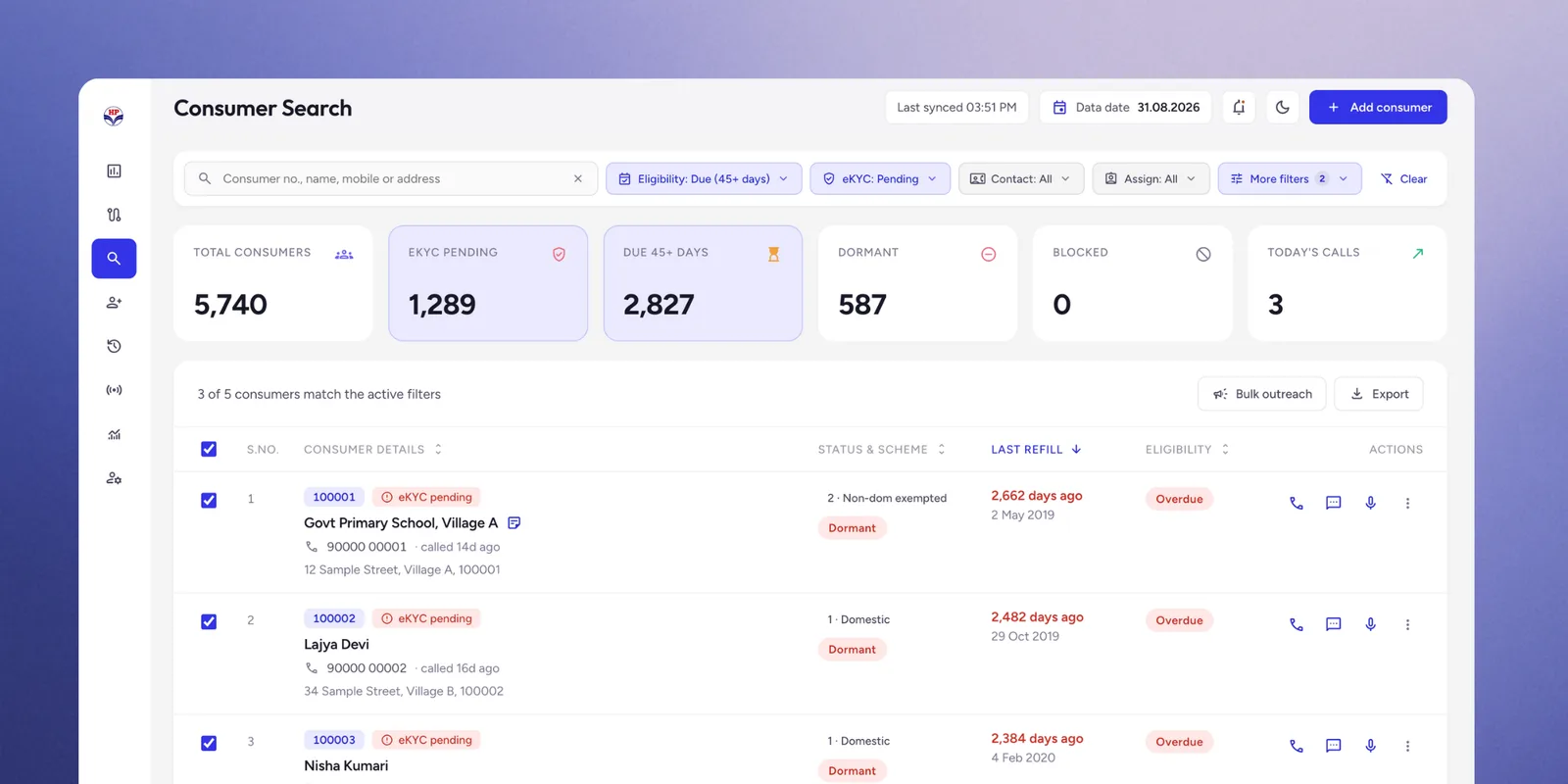
Finding a consumer got just as easy. Staff used to need the ID printed on a physical LPG book; now a name, phone number, or village is enough. Smart filters, eKYC pending, eligibility, contact status, assignment, turn that same search into instant segment lists, so a problem’s size is visible before anyone opens a record.

Overview dashboard
Overview dashboard showing total consumers, active/eligible/due counts, a consumer activity donut chart, open assignments, and booking channel breakdown
Overview dashboard with domestic and Ujjwala scheme counts, last-synced and data-date indicators, and an Upload CSV action
Overview dashboard showing refill volume trend over time, scheme refill performance, workload by employee, and recent assignments
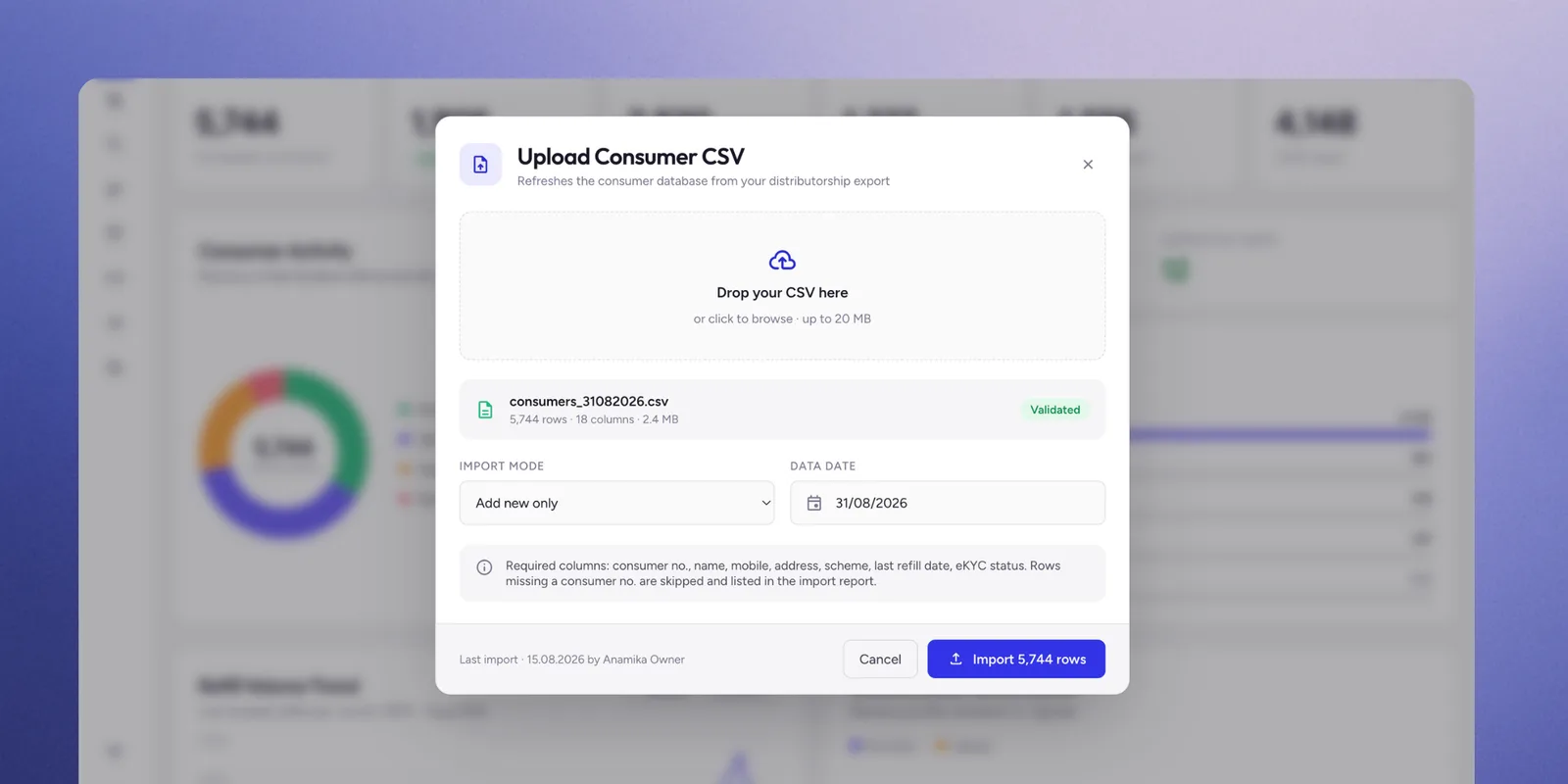
Upload Consumer CSV modal showing file validation, import mode, data date, and required column mapping
Consumer page
Consumer Search screen with name, phone, and village lookup, status and eligibility filters, and a results table with inline call, WhatsApp, and log-a-note actions
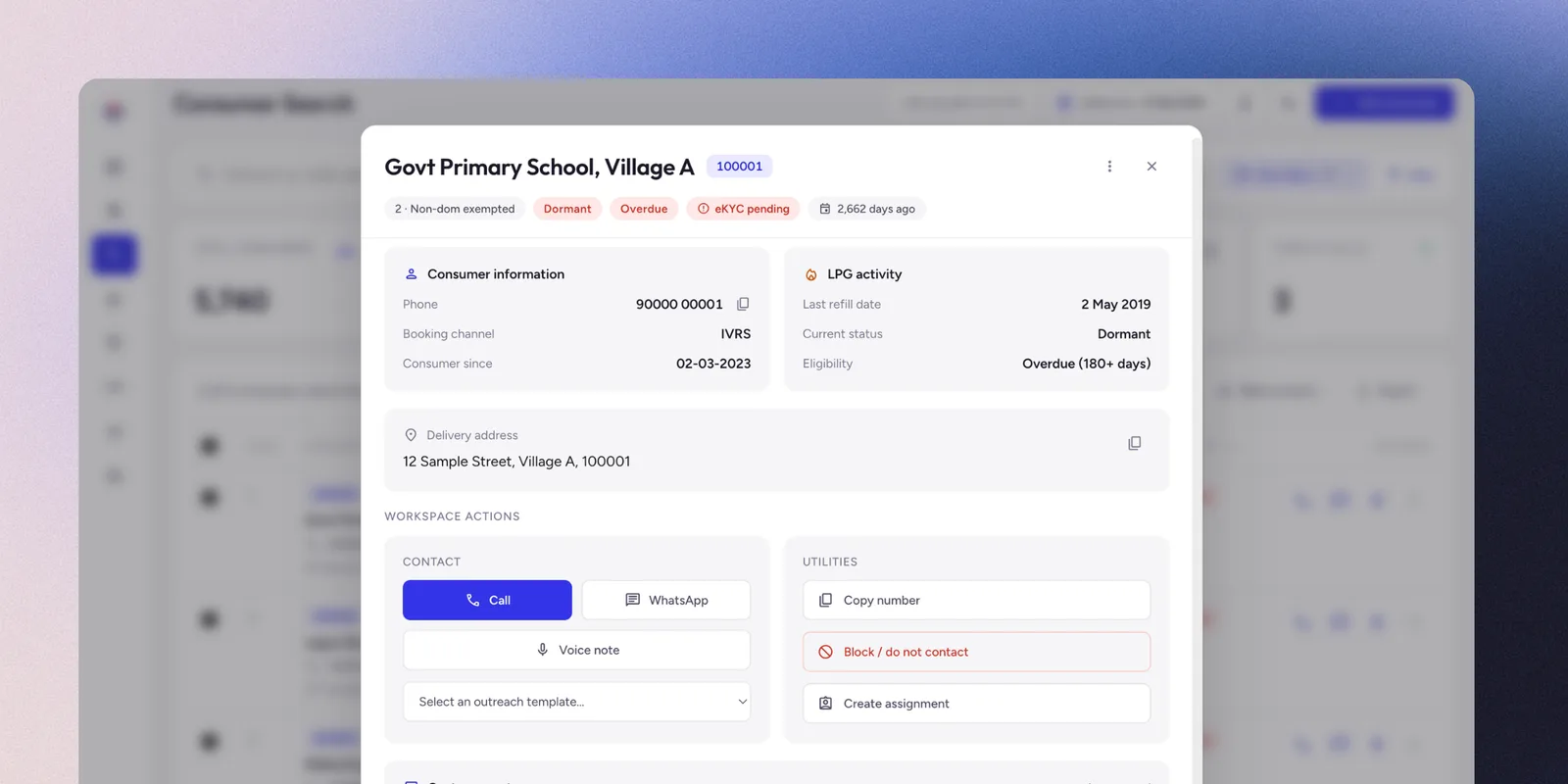
Consumer detail panel showing consumer information, LPG activity, delivery address, and inline call, WhatsApp, voice note, and assignment actions
02

Every task assigned, logged, and proven done

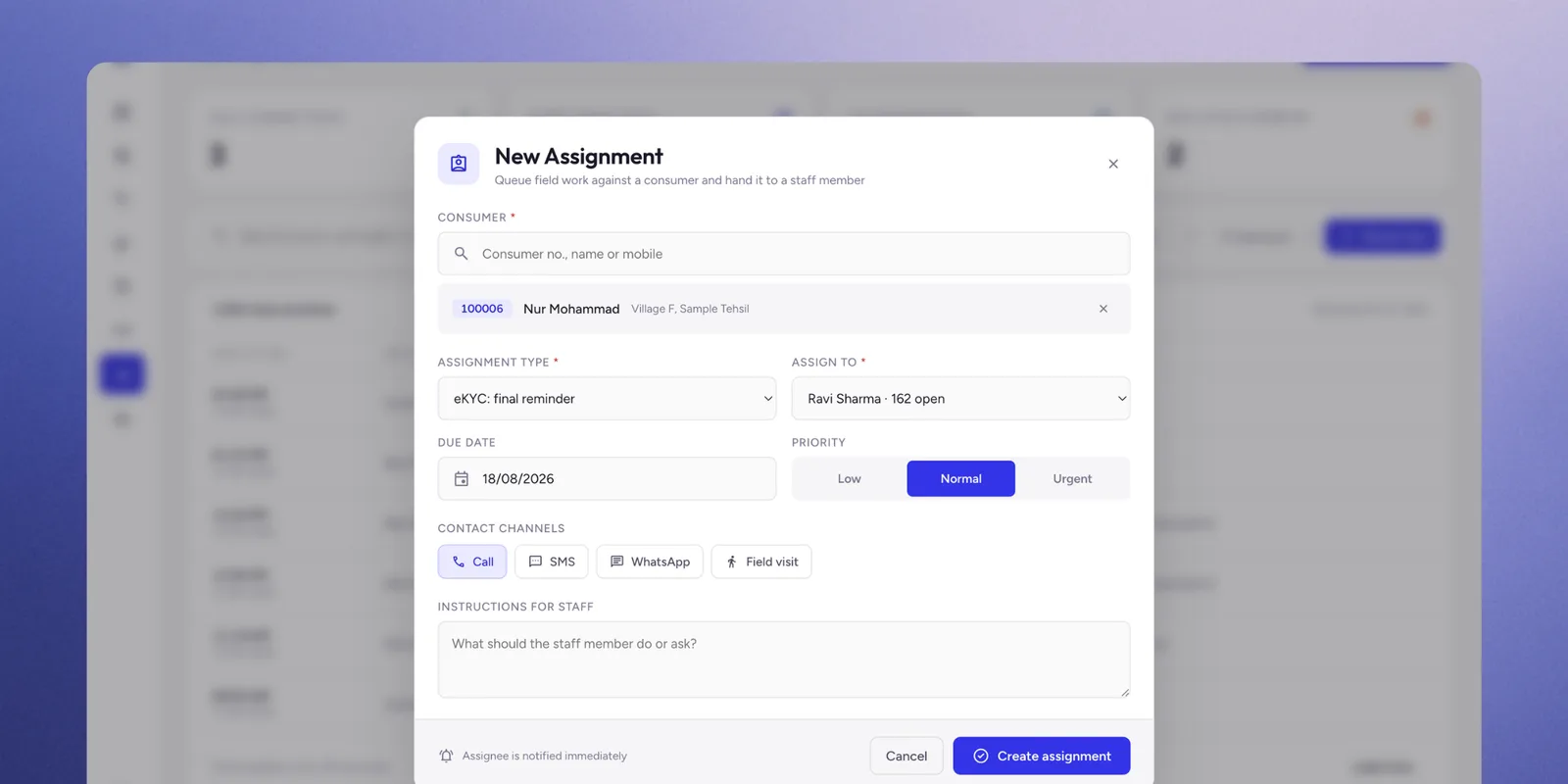
This is the part that replaced Excel sheets, notebooks and the owner’s memory. He opens a consumer, picks an assignment type, an eKYC reminder, a refill call-back, a lead follow-up, sets a due date and a priority, and hands it to a person on the channel they’ll actually use: call, SMS, WhatsApp or a field visit. The assignee is notified immediately and works it from their own queue.


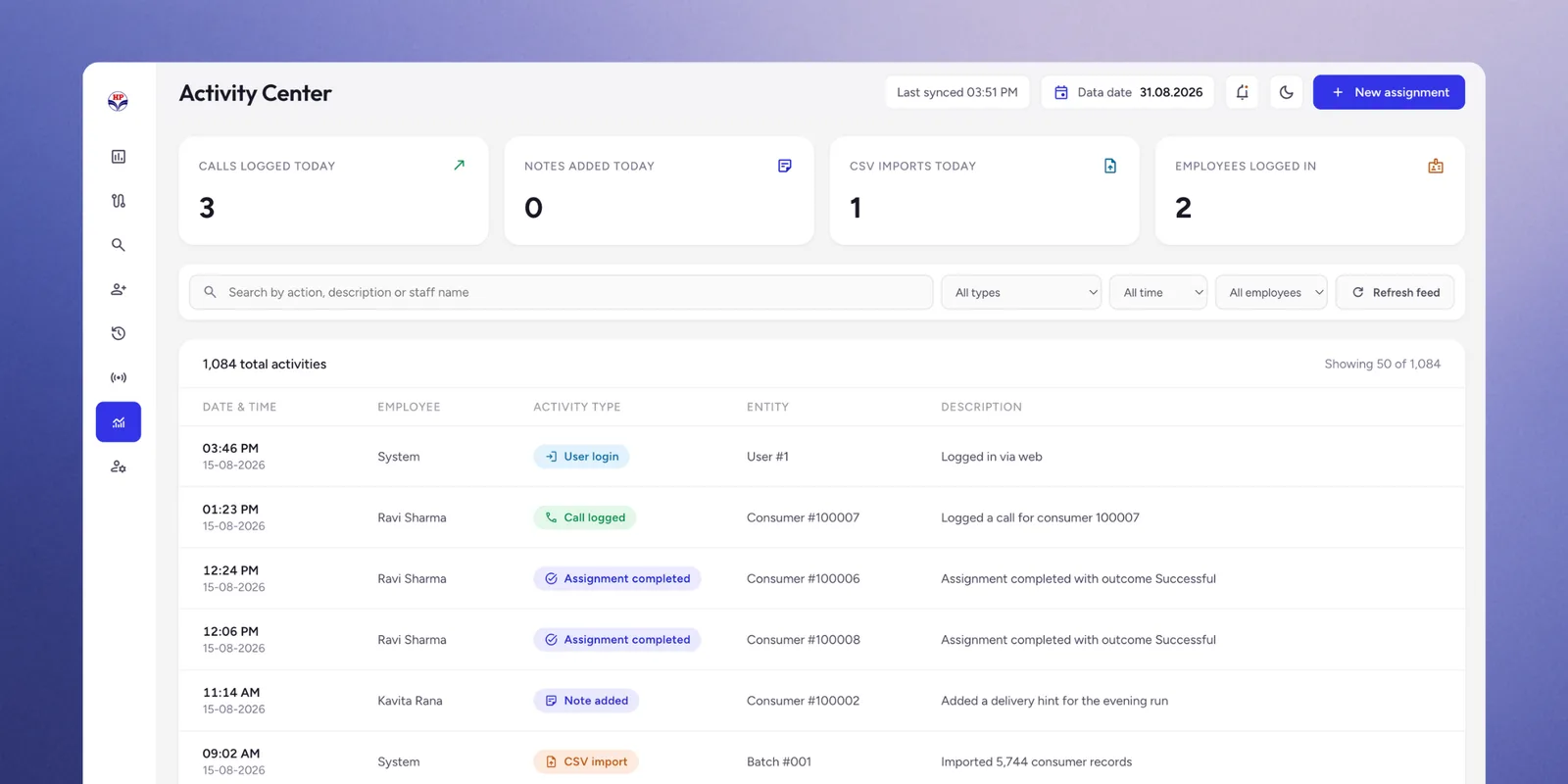
Every action writes to the Activity Center: calls logged, notes added, CSV imports, all filterable by person, type and date. The owner sees everything; each employee sees only their own. I designed that asymmetry as the accountability mechanism itself, because the record exists whether or not anyone thinks to ask for it.


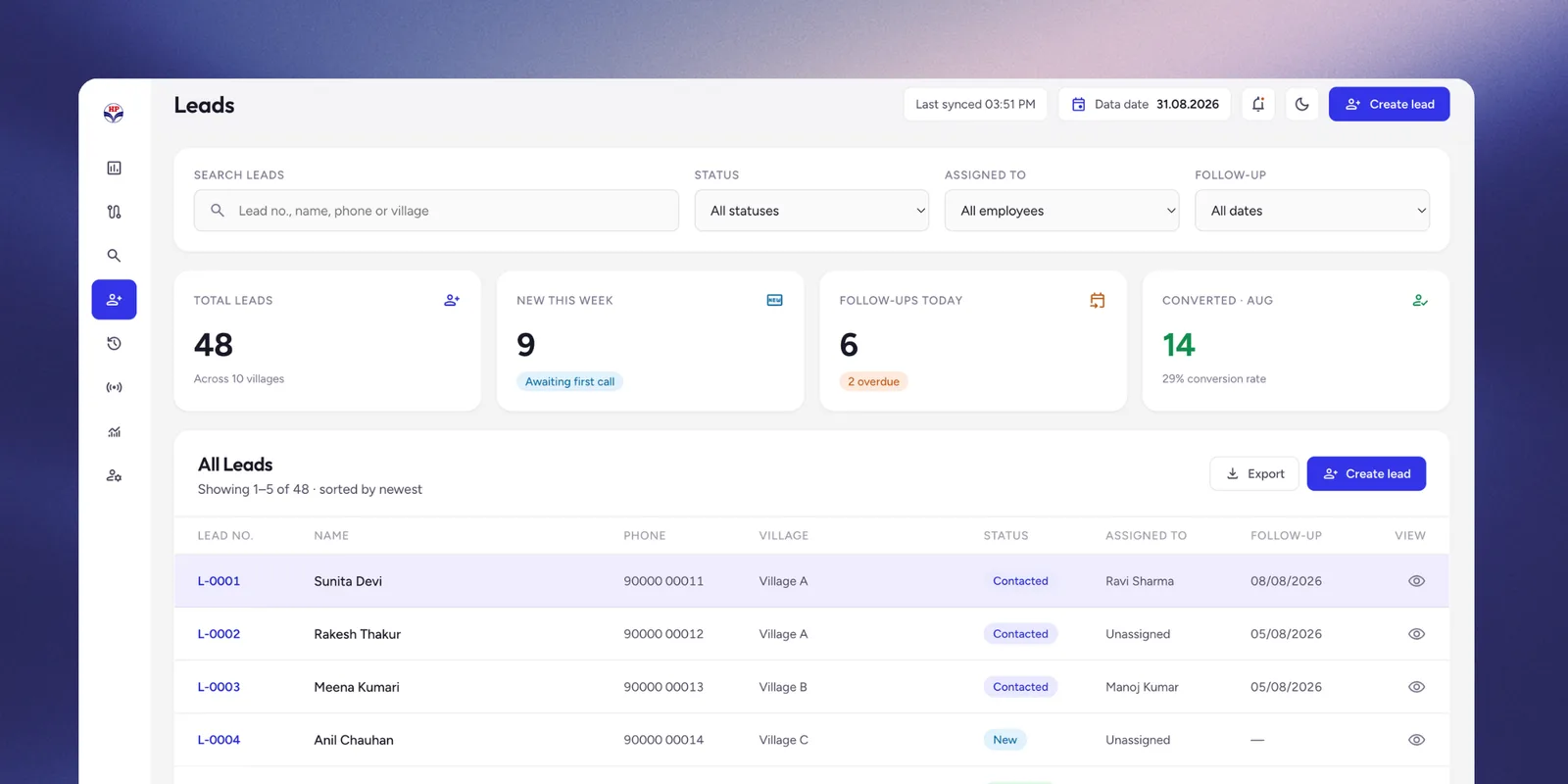
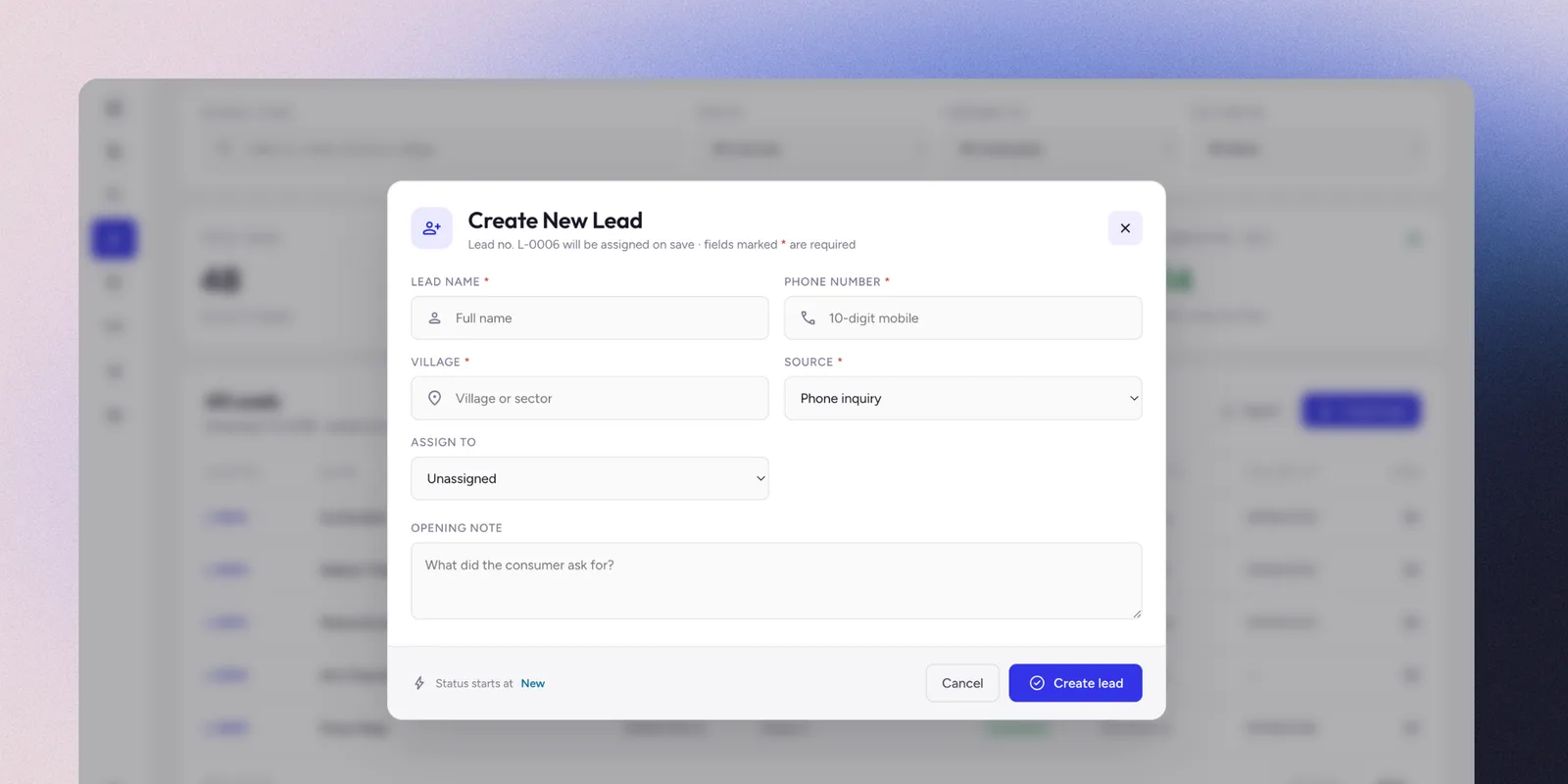
Leads run the same discipline against enquiries that aren’t consumers yet. A cold call or a walk-in gets a name, phone, village and source logged in one screen, then carried through follow-up to conversion instead of living in someone’s memory until it’s forgotten.

Activity Center
Activity Center screen showing calls logged today, notes added, CSV imports, employees logged in, and a filterable feed of 1,084 logged activities
New Assignment modal showing consumer lookup, assignment type, assignee, due date, priority, and contact channel selection
Leads
Leads screen showing total leads, new this week, follow-ups due, conversion rate, and a table of leads by village and status
Create New Lead modal showing name, phone, village, source, assignment, and opening note fields
03

Tell every village when the gas truck is coming

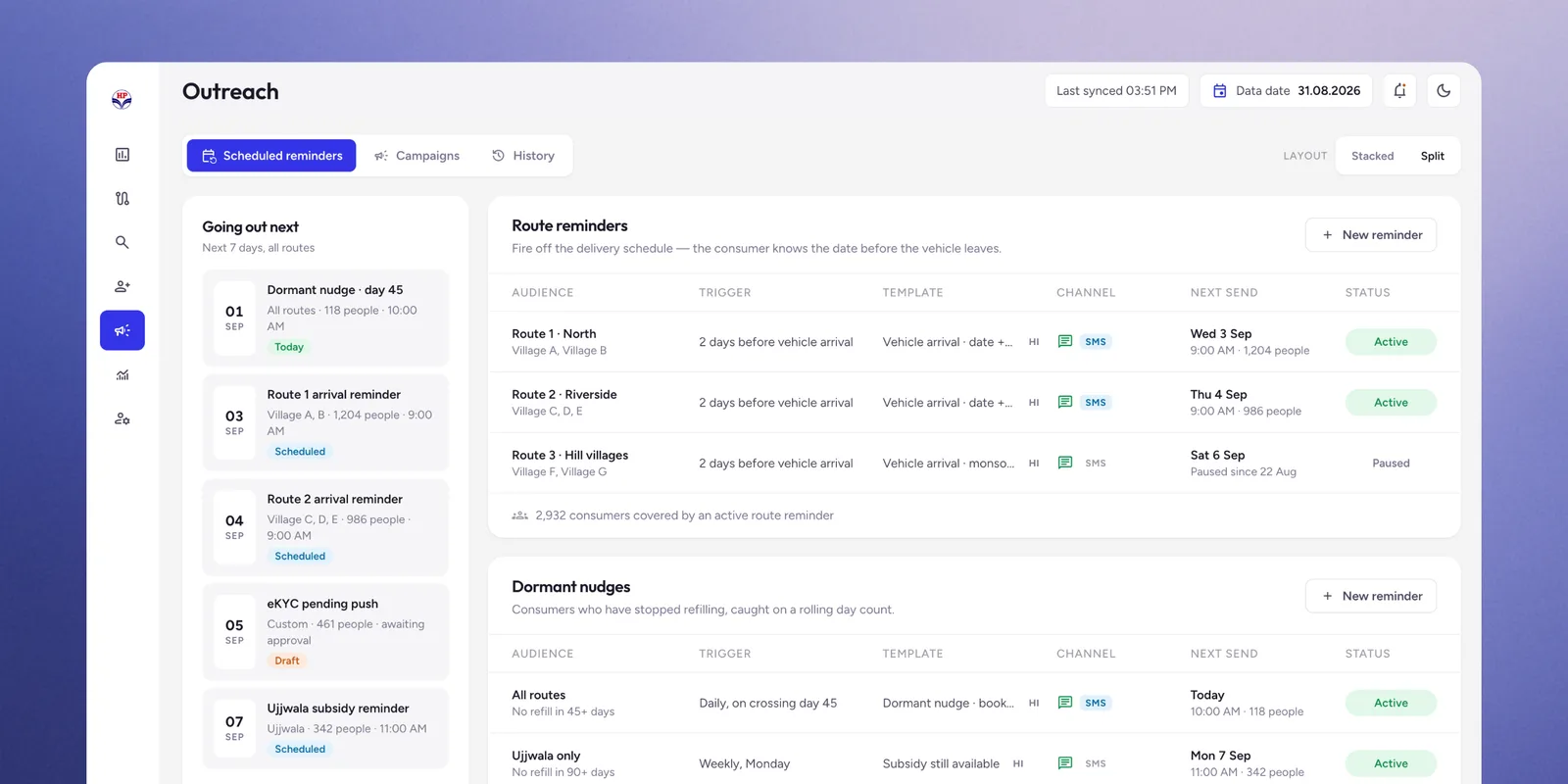
The delivery vehicle reaches each village on a schedule, and consumers used to phone the agency to ask when. Scheduled WhatsApp messages now go out two days ahead, so the customer knows the date and is home for it. Fewer inbound enquiry calls, fewer missed deliveries.


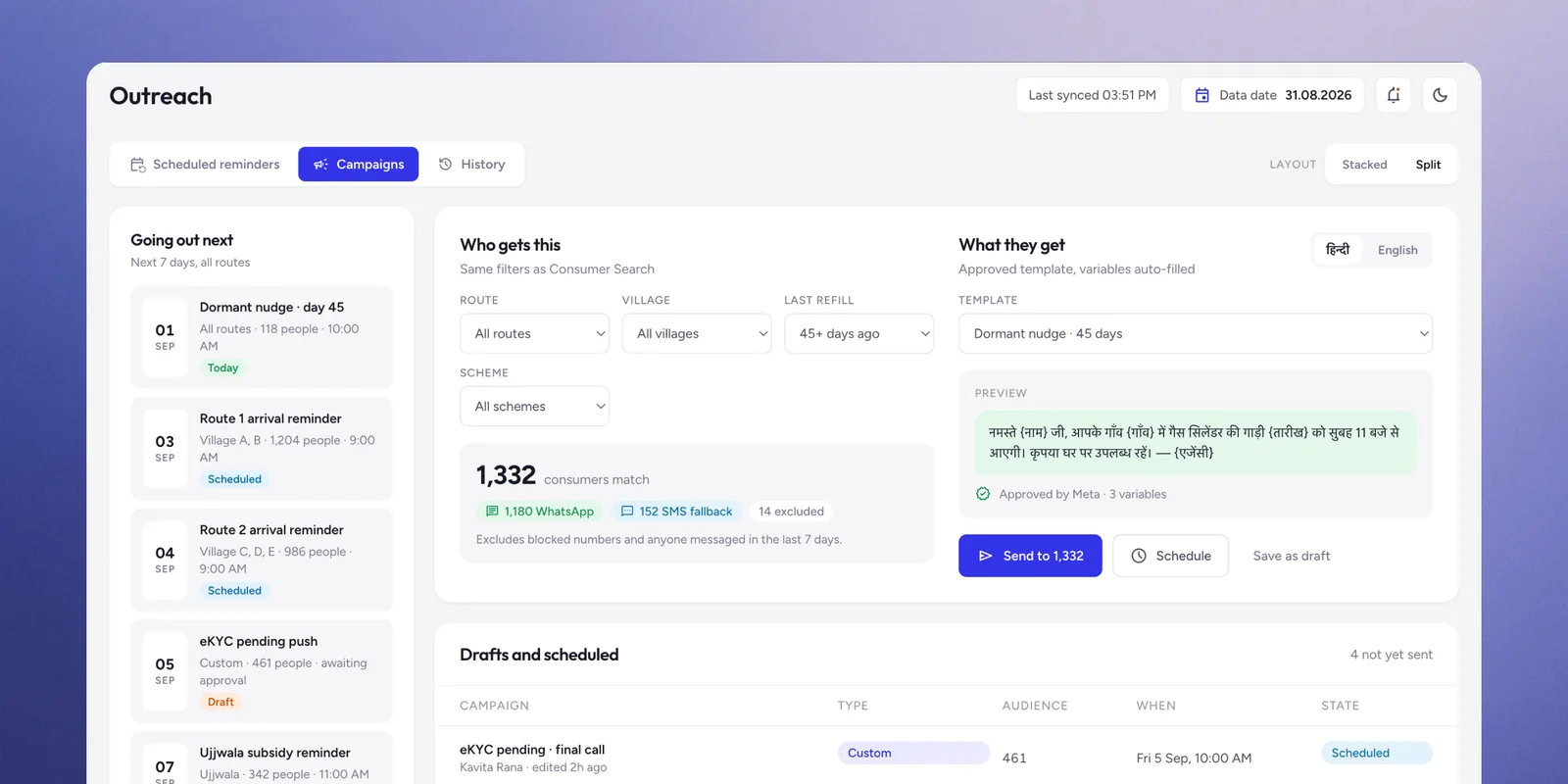
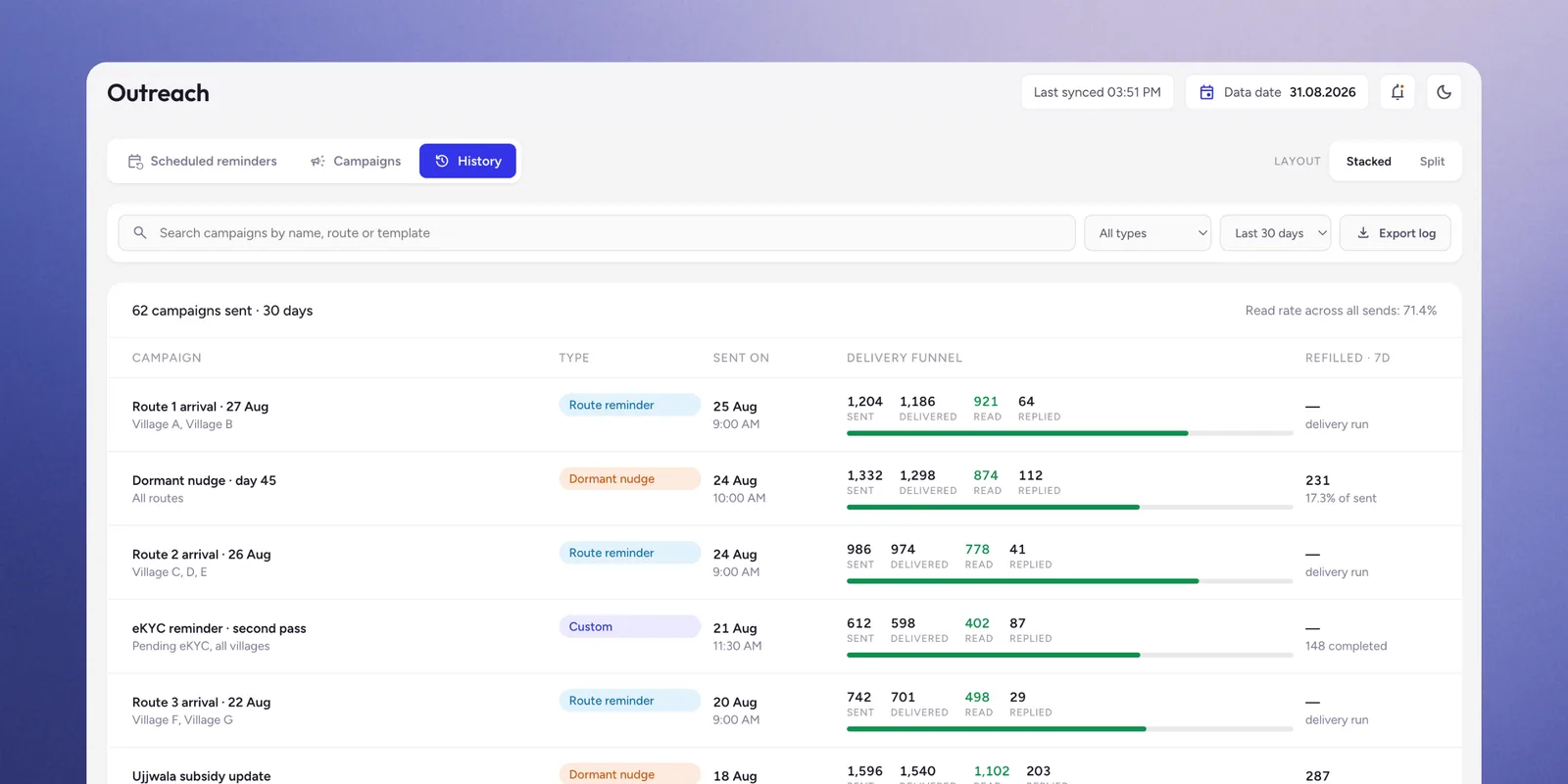
The same channel drives reactivation. Any segment the dashboard can produce, including consumers who haven’t refilled in over two months, can be messaged straight from the list, and Outreach History logs what went to whom. The value isn’t the messaging, it’s that segmentation and contact became one motion instead of two disconnected ones.

Outreach Scheduled Reminders screen showing route arrival reminders and dormant nudges with trigger, template, channel, next send, and status
Outreach Campaigns screen showing an audience filter matching 1,332 consumers, an approved WhatsApp template preview, and send, schedule, or save-as-draft actions
Outreach History screen showing 62 campaigns sent in 30 days with sent, delivered, read, and replied counts per campaign and a 71.4% read rate
Case study highlights
  • ✓ Designed and built a production operations system in 1.5 months, now in daily use by five people against a live base of 5,756 consumers.
  • ✓ Reframed the brief from a lookup tool to an accountability system after discovery revealed the owner's real constraint was managing employees, not finding consumers.
  • ✓ Indexed search on what callers actually know rather than the identifier the official system requires.
  • ✓ Surfaced a channel concentration pattern the business had operated on for years without seeing.
  • ✓ Ran a prompt-to-code process end to end, validating flows against a running product and live users rather than against mockups.
  • ✓ Treated a mature design system as a velocity decision, moving design effort off aesthetics and onto information architecture.
  • ✓ Extended the same accountability discipline to pre-consumer enquiries: Leads has tracked 48 enquiries across 10 villages to a 29% conversion rate.